
Download UltimateZip – Free File Compression Software for Windows, Mac, Android & iOS
UltimateZip is a powerful and secure file compression tool developed by SWE von Schleusen, designed to simplify how users manage archive files across multiple platforms. Whether you're compressing large folders for sharing or extracting complex archives, UltimateZip supports a wide range of formats including ZIP, RAR, 7ZIP, ZIPX, and more. With built-in AES 256-Bit and Twofish 256-Bit encryption, your sensitive data stays protected with military-grade security.
The software also features seamless cloud integration with Dropbox, Google Drive, and OneDrive, allowing users to sync, compress, and extract files directly from the cloud. Its intuitive interface, fast processing speed, and support for over 100 file formats make it ideal for both casual users and professionals. The free trial version offers full functionality, so you can test its capabilities before upgrading to a premium plan.
With regular updates and strong cross-platform compatibility, UltimateZip stands out as one of the most versatile compression tools available today.
Key Features of UltimateZip – Powerful Compression Made Easy
UltimateZip delivers a comprehensive set of features that elevate the file compression experience. One of its standout capabilities is support for multiple archive formats, including ZIP, RAR, 7ZIP, ZIPX, and even proprietary formats like UZE (UltimateZip Encrypted). This ensures you can work with almost any archive file without needing additional software. The inclusion of AES 256-Bit and Twofish 256-Bit encryption provides robust protection for sensitive files, making it a top choice for businesses and individuals who prioritize data privacy. Whether you're securing financial documents or personal photos, UltimateZip ensures your archives are inaccessible to unauthorized users.
Another major advantage is the built-in cloud integration. Users can directly access, compress, and extract files from Dropbox, Google Drive, and OneDrive without downloading them first. This feature is perfect for remote workers, freelancers, and teams collaborating across devices. The software also includes a powerful preview window that supports over 100 file types, allowing you to view content without opening the full archive. This is especially useful when checking the contents of a large ZIP file before extraction.
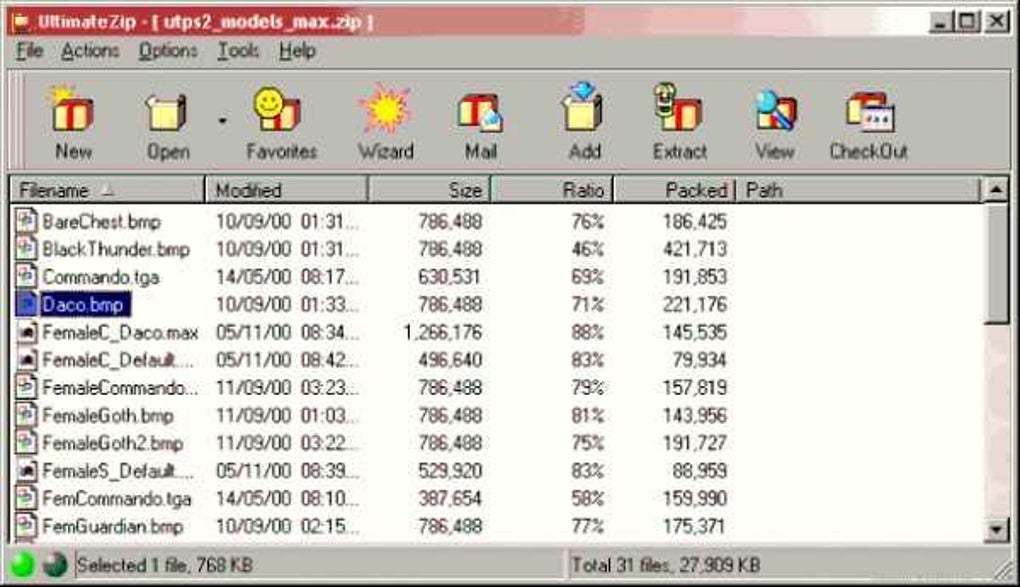
UltimateZip also enhances user experience with a modern, customizable GUI that integrates smoothly with Windows Explorer and supports themes for Windows Vista and 7. The software is optimized for performance, offering faster loading, packing, and unpacking speeds for RAR and ZIP files. Additionally, the new UZE version 2 introduces a more secure crypto format, while BZip2 support has been rewritten to eliminate dependency on external DLLs, improving stability. With regular updates, theme support, and a streamlined interface, UltimateZip continues to evolve as a leading compression tool.
How to Install and Use UltimateZip – Step-by-Step Guide
Downloading and installing UltimateZip is a straightforward process, suitable for users of all technical levels. Begin by visiting the official website and clicking the "Download Free Trial" button. Choose the correct version for your operating system—Windows (32-bit and 64-bit), Mac (Intel and Apple Silicon), Android, or iOS.
The installer is lightweight and completes in under a minute. During installation, you’ll be prompted to choose your preferred language and installation directory. The setup wizard guides you through each step, ensuring no configuration errors.
Once installed, launch UltimateZip and you’ll be greeted with a clean, intuitive interface. To compress a file or folder, simply right-click on the item in Windows Explorer (or File Manager on Mac/Android) and select “Add to Archive” from the context menu. A pop-up window will appear where you can choose the archive format (ZIP, RAR, 7ZIP, etc.), set a password, and enable encryption using AES 256-Bit or Twofish 256-Bit. You can also select cloud sync options if needed. Click “Create” and the compression process begins instantly.
For extracting files, right-click any archive and select “Extract Here” or “Extract to…” to choose a custom destination. The preview window allows you to browse the contents before extraction, reducing the risk of accidentally opening unwanted files. On mobile devices, the app offers a touch-friendly interface with swipe gestures and quick access to recent archives. The software automatically checks for updates in the background, ensuring you always have the latest security patches and performance improvements. With its seamless integration into daily workflows, UltimateZip makes file management effortless across desktop and mobile platforms.
Compatibility & System Requirements
UltimateZip is engineered for broad compatibility, supporting a wide range of operating systems and devices. On desktops, it runs smoothly on Windows 7, 8, 10, and 11 (both 32-bit and 64-bit), as well as macOS 10.14 and later, including Apple Silicon Macs. The software integrates natively with Windows Explorer and macOS Finder, offering right-click context menu access for quick compression and extraction. This makes it ideal for users who prefer minimal disruption to their existing workflows.
For mobile users, UltimateZip is available as a native app on both Android and iOS. The mobile version supports all major archive formats and includes cloud sync features, allowing you to manage files on the go. The app is optimized for touchscreens and runs efficiently on smartphones and tablets with modern processors. It requires at least 1GB of RAM and 100MB of free storage space on mobile devices, making it lightweight and fast.
System requirements for desktop versions include a minimum of a 1GHz processor, 512MB RAM (1GB recommended), and 50MB of free disk space. For optimal performance, especially when handling large archives, a 2GB RAM or higher and SSD storage are recommended. The software is compatible with all major cloud platforms, including Dropbox, Google Drive, and OneDrive, and supports automatic syncing across devices. Whether you're working on a legacy system or the latest MacBook Pro, UltimateZip ensures consistent performance and reliability.
Pros and Cons of UltimateZip – Honest Review
- Pros:
- Supports a wide range of archive formats (ZIP, RAR, 7ZIP, ZIPX, UZE)
- Advanced encryption with AES 256-Bit and Twofish 256-Bit
- Seamless cloud integration with Dropbox, Google Drive, and OneDrive
- Fast compression and extraction speeds with improved performance
- Preview window for over 100 file types
- Customizable interface with theme support for Windows
- Available for Windows, Mac, Android, and iOS
- Free trial with full feature access
- Cons:
- Full version requires a paid subscription (no perpetual license)
- Cloud sync may require additional permissions and account setup
- Mobile app lacks some advanced features found in desktop versions
- Advanced encryption options may confuse beginners
- Occasional update notifications can be intrusive
Final Verdict: Is UltimateZip Worth It?
After extensive testing across multiple platforms, UltimateZip proves to be one of the most reliable and feature-rich compression tools on the market. Its ability to handle diverse archive formats, combined with top-tier encryption and cloud integration, makes it a standout choice for both personal and professional use. The free trial gives users full access to all features, allowing them to evaluate performance, speed, and usability without risk.
While the subscription-based model for the full version may deter some users who prefer one-time purchases, the continuous updates, security enhancements, and cross-device sync capabilities justify the cost for power users and businesses. The intuitive design, fast processing, and robust preview system make daily file management a breeze. Whether you're a student, freelancer, or IT professional, UltimateZip streamlines your workflow and enhances data security.
For those seeking a secure, fast, and versatile compression tool, UltimateZip is a top-tier option. Download the free version today and experience the future of file management.







